OCX Mobile Access Usage Flow
How OCX Mobile Access Connects to the OCX Network
OCX Mobile Access utilizes mobile lines to provide connectivity between the OCX network and your mobile devices.
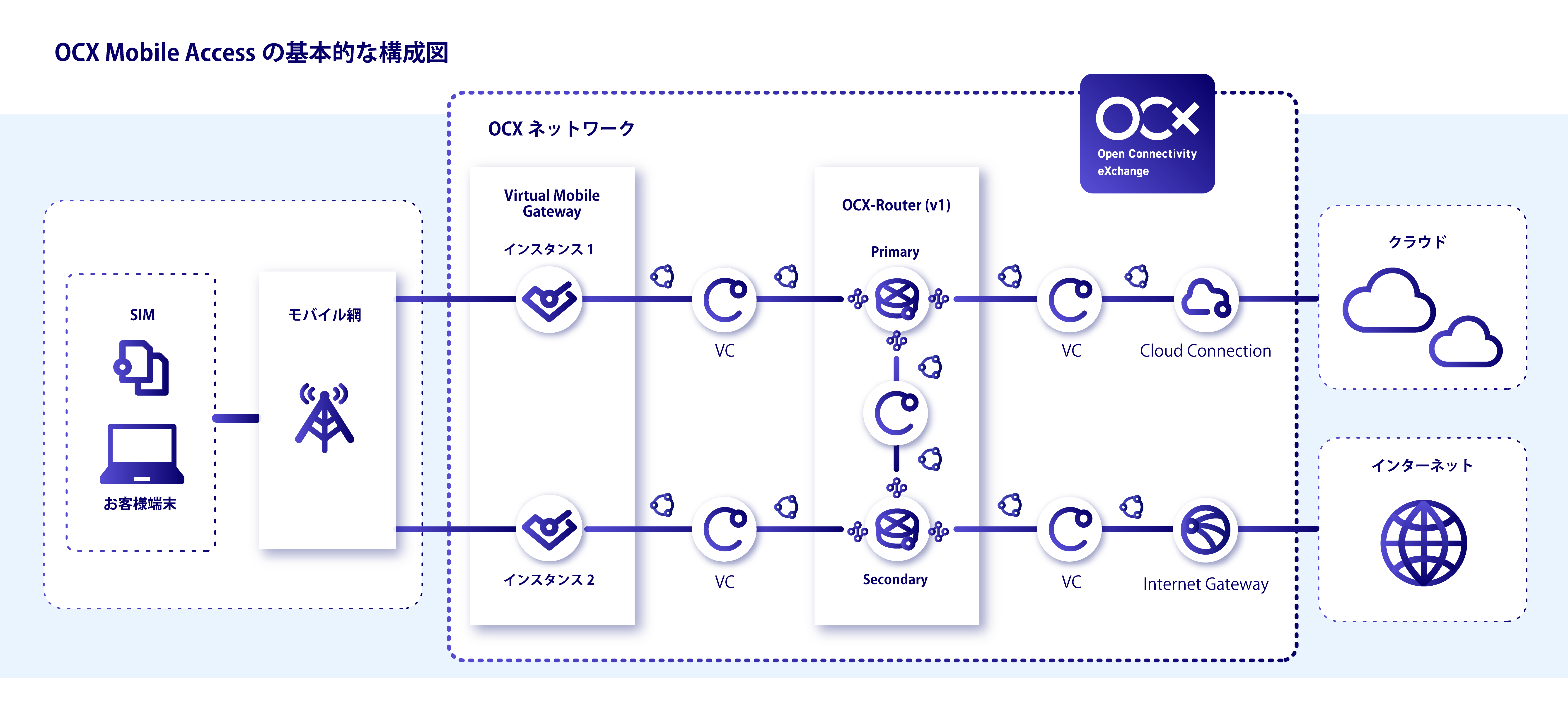
After purchasing a SIM Pack and receiving SIMs via shipment or issuance, you can connect your environment to the OCX network through a mobile line using a Virtual Mobile Gateway.
Basic Configuration Diagram of OCX Mobile Access
Flow for Using OCX Mobile Access
To use OCX Mobile Access, please prepare the following necessary items:
- Configuration of the OCX Mobile Access network
- Purchase of a Data Pack (Usage-based billing applies if not purchased)
- Acquisition and configuration of SIMs
- Configuration of the device
Details for each item are provided below.
Configuration of the OCX Mobile Access Network
The Virtual Mobile Gateway requires a connection to an OCX-Router(v1) or on-premises equipment (CPE).
From the perspective of redundancy, the recommended configuration using OCX-Router(v1) is as shown in the Basic Configuration, though connectivity configurations other than the Virtual Mobile Gateway and OCX-Router(v1) are not limited to this.
-
Connection Resource Settings
3-1. for OCX-Router(v1)3-2. for on-premises equipment (CPE)
- Create Physical Port
- Create VCI
- Configure CPE BGP Parameters * Configuration required based on your device.
For further details, please refer to the documentation for each resource.
Purchase of Data Pack
You can purchase a Data Pack as a method to use a fixed amount of data communication capacity at a flat rate when using OCX Mobile Access.
If you do not purchase a Data Pack, usage-based billing per 1MB will apply.
*Note for customers purchasing the Annual Contract (10TB) Data Pack:
Rights to use 10,000 SIM cards will be granted with the initial fee waived.
Please note that monthly fees for the SIMs will still apply.
Acquisition and Configuration of SIMs
Communication becomes possible by purchasing SIMs and linking them to a Virtual Mobile Gateway Address Pool.
*Note for customers purchasing the Annual Contract (10TB) Data Pack:
Since SIM cards are included with the Data Pack, there is no need to purchase a new SIM Pack. Please proceed directly to the SIM Pack shipping procedure.
Device Configuration
Insert the acquired SIM into your device and perform the device settings.
- Insert a card-type SIM or configure eSIM Settings
- Device Settings